TAMMY BUILDS CLIENT TOOLKIT · PREMIUM SOFTWARE
Compare the proposals. Understand the costs. Hire with confidence.
An independent planning and comparison tool to help you understand competing website quotes before you commit your money.
Before you spend thousands on a website, know exactly what you’re paying for.
Two developers can offer different things for nearly the same price. Don’t just compare prices—compare what you’re actually getting.
- Compare proposals and written commitments.
- Understand setup, recurring and bundled costs.
- Track references, answers and missing details.
- Create a personalized PDF decision report.
- Save separate projects and keep local backups.
Want the details? Choose a topic below, then open the questions that matter to you.
FEATURES & VALUE
What can the Toolkit help me do?
Five reasons to make your website hiring decision with better information.
How can I compare developers beyond their prices?
Compare developers on more than just price
Put competing proposals side by side, including scope, written commitments, experience, references and unanswered questions.
Can I see costs beyond the initial quote?
Discover the real cost—not just the quoted price
Account for setup fees, recurring expenses, bundled services, delayed charges and introductory free periods. Avoid counting bundled costs twice.
How will I know what to ask before signing?
Know what to ask before you sign
Review unclear promises, track developer answers, record your reference checks and identify important follow-up questions.
What will my personalized PDF report include?
Leave with a personalized decision report
Produce a PDF that brings developer comparisons, cost calculations, proposal ratings and outstanding concerns together.
How do I keep my project information private?
Keep control of your information
Work locally, save separate projects and back up your data without sending sensitive proposals to an AI service.
REAL SOFTWARE. REAL OUTPUT.
See what you’re getting.
Open an example to take a closer look. These are actual Toolkit images and reports using sample project data. The example companies and amounts are test data, not customer endorsements or live quotes.
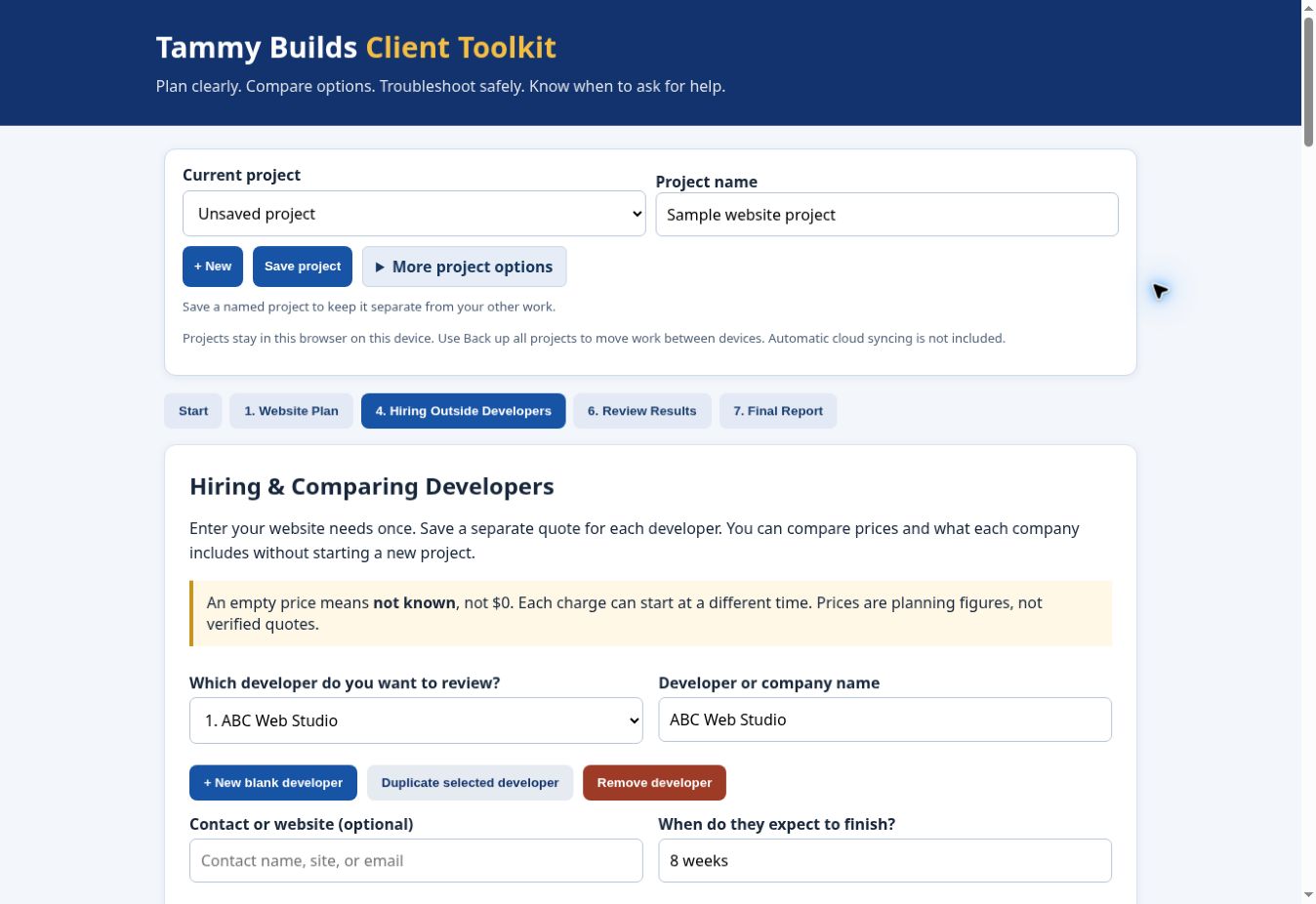
What does the application look like?
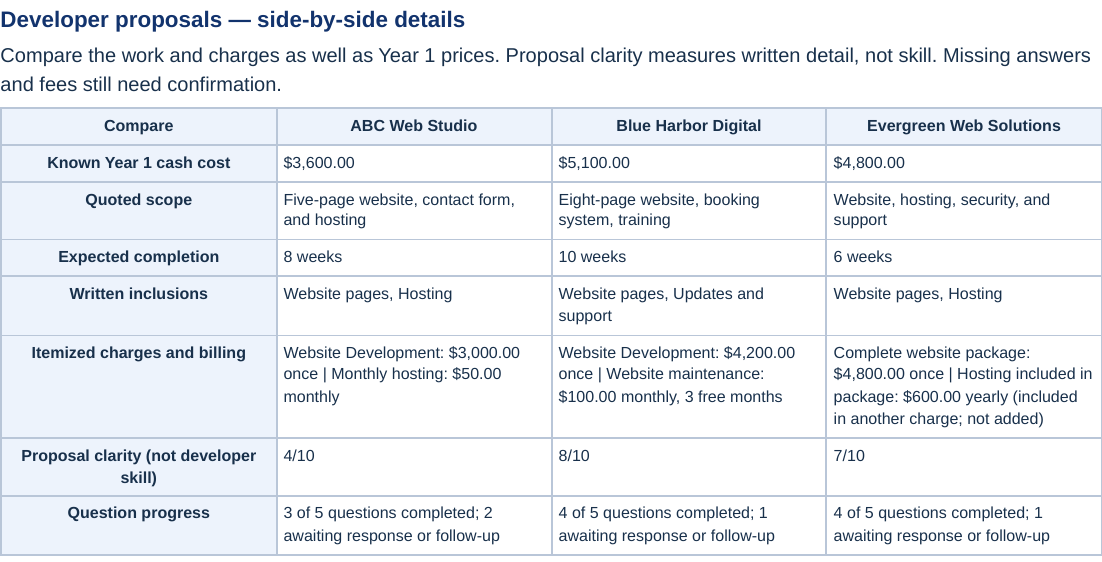
Can I see a side-by-side developer comparison?
Compare the work and charges alongside first-year cash costs.
Proposal clarity measures the written detail, not developer skill. Missing prices and answers still need confirmation.
Can I see the personalized PDF report?
Take the comparison with you. Keep costs, written commitments, proposal ratings and outstanding concerns together before choosing a developer.
Open the actual sample PDF ↗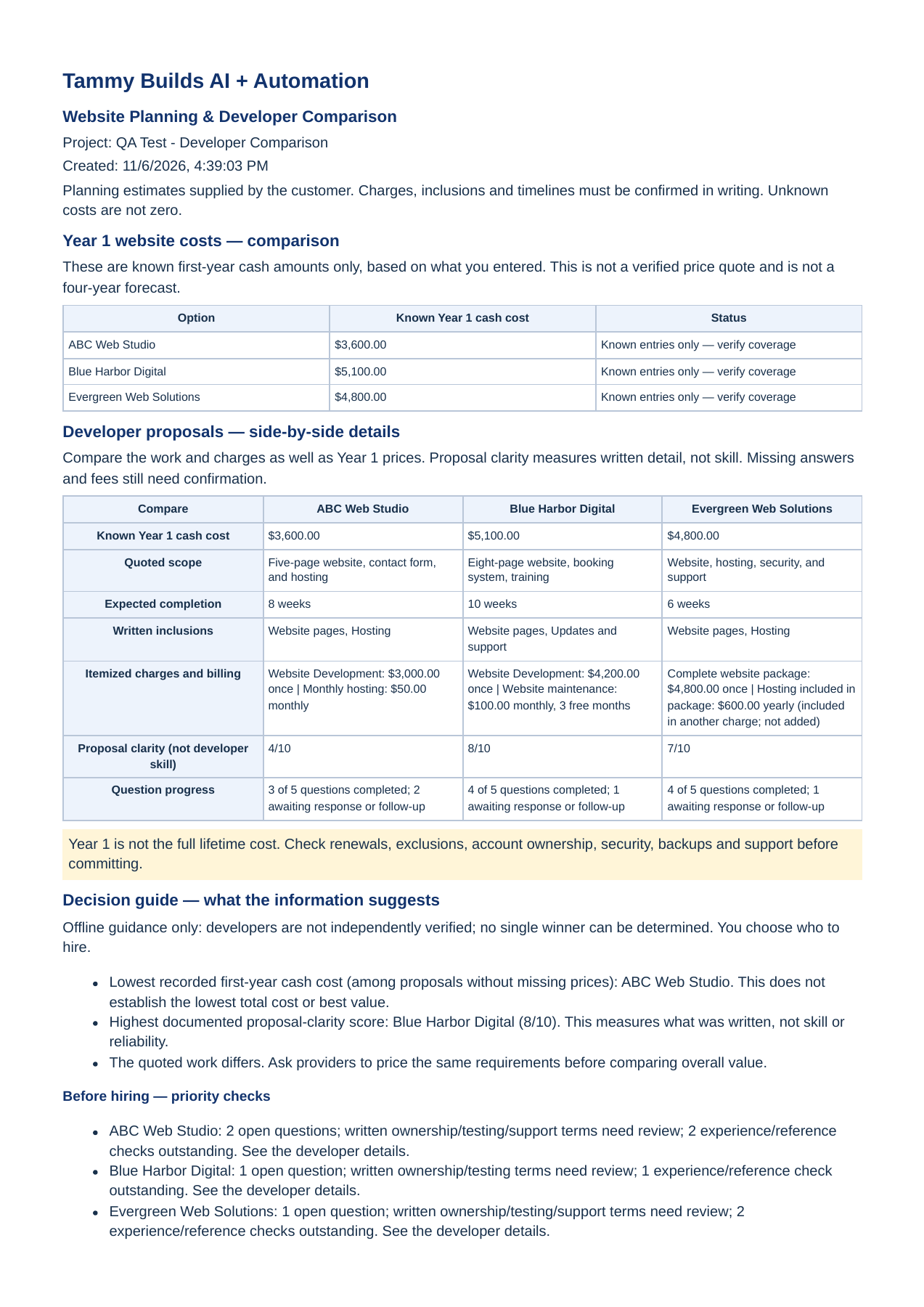
USING THE TOOLKIT
How does it work?
What is included in the software purchase?
The $65 introductory offer buys the current Client Toolkit planning and comparison software.
- Downloadable website planning and comparison software.
- Side-by-side developer and cost comparisons.
- Proposal, experience, reference and follow-up tracking.
- Separate saved projects, local backup and restore.
- Personalized PDF decision reports.
- Product instructions and support resources to help you get started and use the Toolkit, available when purchases open.
It is a one-time software purchase. No mandatory subscription is needed for current Toolkit features.
The upcoming AI support service is separate from the current software offer. This purchase does not guarantee future AI access, free access or unlimited use.
What are the steps from quotes to a decision?
- Describe your website. Record your goals and what it needs to do.
- Enter the proposals. Add prices, recurring services, packages and deliverables.
- Review the evidence. Check written promises, previous work, references and questions.
- Create your report. Compare options and identify what to clarify before you hire.
Can I plan a new website, change one or record a problem?
Yes. Plan a new website, organize changes to an existing one, or keep troubleshooting notes. Choose DIY or hiring comparisons when they apply to your project.
How do I save projects, back up or move computers?
Your projects stay in your browser on your computer. Save separate projects and export JSON backups for safekeeping.
Use a matching backup to restore your project information. A PDF is a report, not a restorable project backup.
Automatic cloud syncing is not included. Keep a current backup before changing computers or clearing browser data.
Read the practical Toolkit instructions →SUPPORT & COMING NEXT
What support is available?
We’re developing AI product support to help you understand Toolkit features, follow instructions and work through common problems. It is planned support, not an active feature today.
What help is available now, and what is planned for launch?
A public Help Center preview is available now.
Product instructions, guidance and common troubleshooting information are planned for initial launch. Launch instructions are still being completed and checked.
Contact support@tammybuilds.com for a product question.
Is the AI Support Assistant available today?
Not yet. We’re building an assistant you can ask questions in your own words, using the Toolkit’s documentation for guidance.
The aim is to help you find the right feature, follow the steps and troubleshoot common problems with less searching.
Target: December 1, 2026. This is a development target, subject to testing and release readiness. The assistant is not an active feature in the current version.
Its role is helping you use the product. It is not intended to independently research developers, evaluate confidential proposals or choose who you should hire.
Does my software purchase guarantee future AI support?
No. The $65 offer is for the current planning and comparison software. It does not guarantee access to the future AI service.
AI access, pricing and usage limits have not been finalized. Free, unlimited or permanently free AI support is not promised.
Accuracy, usage limits and operating costs must be tested before release.
Customer project information and generated reports must not become shared support-bot knowledge.
YOUR DECISION. YOUR INFORMATION.
What should I know before using it?
Does the current Toolkit send my proposals to an AI service?
No. The current decision guide uses rules and information you enter. It does not send proposals to an AI service.
Projects stay in your browser on your computer unless you choose to export or share them.
Does it verify developers or choose who I should hire?
No. It helps you organize your own checks. It does not independently verify developers, guarantee their work or choose a developer for you.
Proposal clarity describes the written proposal. It is not a rating of developer skill or reliability.
Are the cost calculations guaranteed prices?
No. Cost scenarios are planning estimates based on your entries, not live quotes.
- Unknown costs are not zero.
- First-year costs are not the full lifetime cost.
Confirm scope, fees, renewals, exclusions and commitments with each provider before signing.